01 · THE INSPECTION
Original report · Page 11
“Two conductors were observed connected to a breaker terminal not rated for multiple conductors. Recommend correction by a qualified electrical contractor.”

Upload the inspector’s PDF. Get two things inspection software doesn’t give you: a calm buyer summary your client actually reads, and a professional repair letter ready for the seller — every item cited to its page.
Illustrative example · Tap underlined terms for plain-English meanings.
Original report · Page 11
“Two conductors were observed connected to a breaker terminal not rated for multiple conductors. Recommend correction by a qualified electrical contractor.”
Two wires share a breaker connection designed for one. Have an electrician correct the connection.
1. Have a qualified electrical contractor correct the double-tapped breaker in the main electrical panel. (Report p. 11)
Reviewed by you. Shared by you.
Why agents add RepairLetter
Works alongside the inspection software your inspector already uses — no connection or switch needed.
How it works
01
Add your inspection PDF and property details.
02
Edit the findings, choose repairs or credits, and approve the final draft.
03
Copy into your state’s repair form, or download a PDF to share yourself.
Trust & protection
Your license, your reputation, your client. RepairLetter drafts — you stay in control.
Nothing is sent automatically. Every finding, summary, and request waits for your review.
Check the inspector’s original words in seconds before you share anything.
If part of a report is hard to read, we point it out for you to check instead of guessing.
Safety findings stay clearly marked and always appear in the buyer summary.
Never used to train AI. PDFs delete automatically after 30 days — or right away, whenever you choose.
Less busywork. More perspective.
Go back to the inspector’s original words before making a decision.
The AI drafts. You edit, include, exclude, and decide what to share.
Bring a text-based PDF. No special inspection software connection needed.
Plain-text requests fit your existing process. No new legal forms.
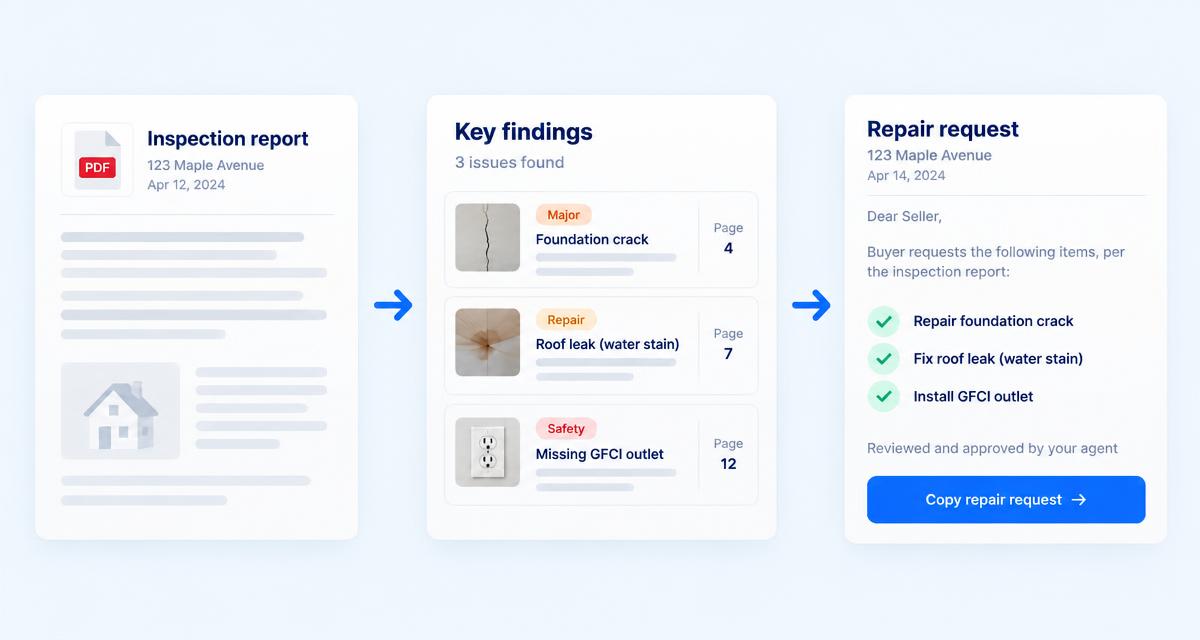
Before / after
Illustrative example, not a client’s report.
“Active leakage was observed at the supply connection beneath the kitchen sink at the time of inspection. Recommend repair by a qualified plumbing contractor and re-evaluation following repair.”
The water supply connection under the kitchen sink was leaking during the inspection.
Repair request
Have a qualified plumbing contractor repair the leaking supply connection beneath the kitchen sink and re-evaluate following repair. (Report p. 24)
Simple pricing for your next inspection — and the one after.
$0
3 reports. No credit card.
$29 / month
or $290/year · save $58
Your data is stored encrypted and your inspection PDFs are private. PDFs are automatically deleted after 30 days; your findings and summaries stay until you delete the report. Your data is never sold.
No — it summarizes the inspector’s report. Always refer to the full inspection report for complete details, and review every finding before sharing.
Any that produces a text-based PDF — Spectora, HomeGauge, ISN, Horizon, Palm-Tech and more. Scanned or image-only PDFs are not supported.
They’re rough national ranges for planning, not contractor quotes. Always get contractor quotes. You can turn cost estimates off in Settings.
Yes. You can cancel anytime and still view and export your existing reports.
Less time reading. More clarity for your next step.
3 full reports free. No credit card.